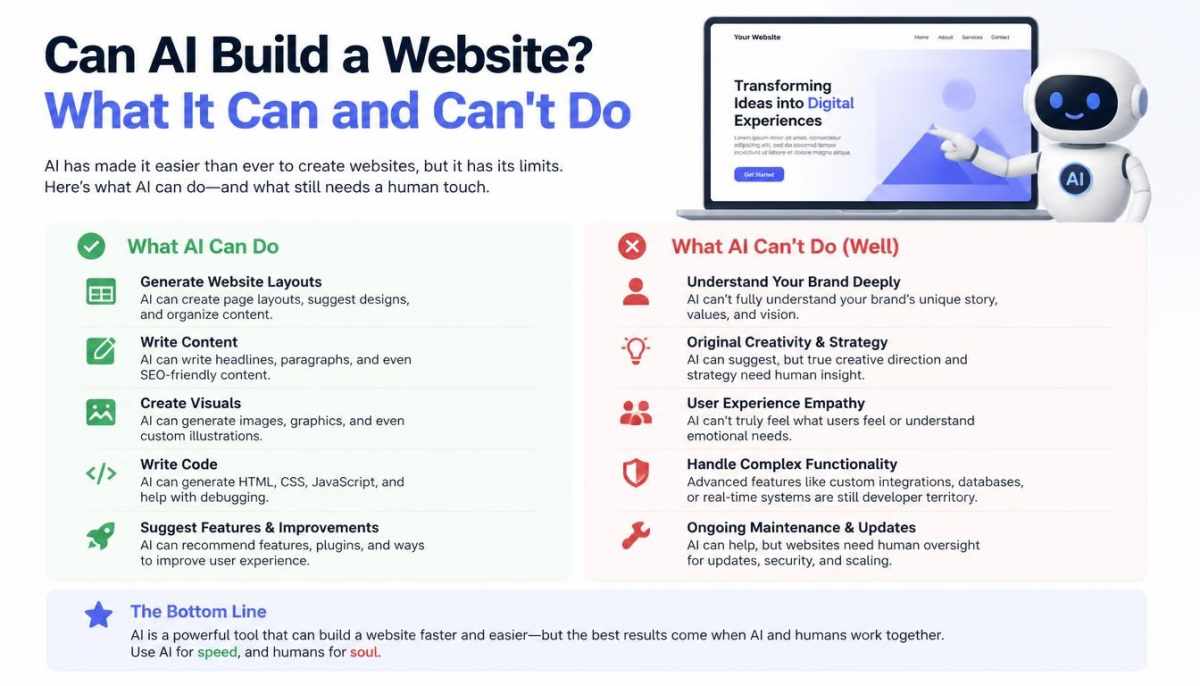
Can AI Build a Website? What It Can and Can’t Do
Artificial intelligence has made website creation easier than it used to be. You no longer need to understand every part of web design or know how to write code before creating a basic website. Today, AI website builders can generate page layouts, suggest website content, create images, and help organize important sections from a simple description.
But can AI really build a complete website that is ready for a real business?
Yes, AI can build a functional website, but the result still needs human review and improvement. A website that looks finished is not necessarily ready to attract customers, appear in search results, or handle business activities properly.
The difference comes down to what you expect the website to do. A simple portfolio or landing page may need very little manual work. An online store, service website, or growing business website usually requires more planning, testing, and customization.
This article explains what AI can build, how the process works, which limitations to consider, and how to decide whether an AI-built website is right for your needs.
Can AI Build a Website From Scratch?
Yes. AI website builders can create a website based on information you provide about your business, audience, and preferred design.
For example, you could tell an AI website builder:
“I need a professional website for a small landscaping business. It should include a homepage, services page, about page, contact form, customer reviews, and a green-and-white design.”
The platform may use that description to generate a starting website with a layout, navigation menu, sample text, images, and relevant sections.
Some platforms also let you continue editing the website through text prompts. You can request a different color scheme, add a section, change a heading, or adjust the layout.
However, the exact features depend on the platform. Some AI builders create websites inside a managed system, while other AI tools can help developers generate code for more customized projects.
For example, Wix AI Website Builder can generate a site from a description and let users refine it through its editor. WordPress.com also provides AI tools that can help create and update website layouts, text, and images.
The important point is that AI can handle much of the initial setup, but you remain responsible for checking whether the finished website actually meets your business requirements.
How Does an AI Website Builder Work?
An AI website builder uses your instructions to generate a website structure and design. You do not need to prepare every page manually before getting started.
Most platforms follow a similar process.
1. Describe Your Business or Website Idea
Start by explaining what kind of website you want to create.
Include details such as:
- Your business name and industry
- The products or services you offer
- Your target audience
- The main purpose of the website
- Your preferred colors and design style
- The pages and features you need
Specific instructions usually produce a more relevant starting point than a short request such as “build me a business website.”
For example, a photographer may need a portfolio, image galleries, pricing information, and a booking form. A local repair business may need service descriptions, operating hours, customer reviews, and contact information.
2. Let AI Generate the Initial Website
After receiving your instructions, the platform may generate a homepage, navigation menu, page sections, sample content, and visual design.
Some builders also suggest additional pages based on your industry.
You should treat this result as a first draft rather than a finished website. AI may misunderstand your business, include unnecessary sections, or write descriptions that sound too generic.
3. Customize the Design and Content
Review every important section before publishing.
Check whether the website uses your actual business information, whether the colors match your brand, and whether visitors can easily find the information they need.
You may need to replace sample images, rewrite headings, remove unnecessary sections, and adjust buttons or forms.
A website should reflect the business behind it rather than look like a generic template with a different logo.
4. Add the Features Your Website Needs
A website’s requirements depend on its purpose.
For example, an online store may need product pages, payment processing, shipping settings, and inventory management. A consulting business may need appointment booking, service descriptions, and lead forms.
AI can help configure some of these features, but you should test each one before accepting payments or collecting customer information.
5. Connect a Domain and Publish
Once the website is ready, connect your domain name and review the platform’s hosting and publishing requirements.
Some builders include hosting in their paid plans. Others offer a free starting option but require an upgrade for a custom domain or advanced business features.
Before publishing, test the website on a phone and computer. Make sure the navigation works, important pages load correctly, and visitors can complete the actions you want them to take.
What Types of Websites Can AI Build?
AI website builders are suitable for several common website types. However, the amount of manual work depends on the complexity of the project.
| Website type | What AI can help create | Human work still needed |
| Business website | Homepage, services, about, contact pages | Accurate business details and lead testing |
| Portfolio website | Project galleries and introduction pages | Selecting genuine work and organizing projects |
| Blog | Blog layout, categories, and article drafts | Research, editing, and publishing strategy |
| Online store | Product layouts and store structure | Product data, payments, shipping, and testing |
| Landing page | Headlines, benefits, and contact forms | Offer strategy and conversion testing |
| Booking website | Service pages and booking sections | Availability, payment, and booking verification |
A simple portfolio or landing page is usually easier to create than a website with several connected systems.
If you are planning a business website, first understand its purpose and structure. Our guide to business website classification criteria can help you identify the type of website your business actually needs.
What Are the Benefits of Building a Website With AI?
AI can reduce some of the time and effort involved in creating a website. It is particularly useful for beginners and small businesses that need a starting point without managing every design detail themselves.
Faster Initial Website Creation
Traditional website development may involve planning layouts, preparing content, selecting images, and configuring individual pages.
An AI builder can generate a first version of these elements from a single brief. This gives you something to review and improve instead of starting with a completely blank page.
The time saved depends on the website’s complexity and how much customization is required.
Less Technical Knowledge Required
Many AI website builders are designed for people who do not know how to code.
You can often make basic changes through visual editors or natural-language instructions. This makes it easier to update headings, change colors, add sections, and adjust page layouts.
However, advanced functionality may still require technical knowledge or professional support.
Help With Website Content
AI can suggest homepage headlines, service descriptions, frequently asked questions, and other basic website copy.
It can also help organize information into sections that are easier to read.
Still, you should check every important statement. AI-generated text may contain incorrect details, make unrealistic promises, or describe services your business does not actually provide.
A Useful Starting Point for Small Businesses
A new business may not need a highly customized website immediately.
An AI-generated website can provide a starting structure for presenting services, sharing contact information, and collecting inquiries.
Once the business grows, you can improve the design and add features based on real customer needs.
What Are the Limitations of AI Website Builders?
AI makes website creation easier, but it does not remove every challenge. Some limitations become more noticeable when you try to build a website for a real business rather than a simple demonstration.
1. Generic Design and Repeated Layouts
AI may generate a professional-looking website, but the design can still feel similar to many other websites.
This happens when the instructions are too general or the builder relies heavily on predefined layouts.
For example, several local businesses may receive nearly identical homepage sections, stock photographs, and generic marketing headlines.
To improve the result, provide brand-specific details, use genuine business images, and customize the page structure around your customers.
2. Incorrect or Generic Content
AI does not automatically know your company’s real history, policies, qualifications, prices, or customer experiences.
If you do not provide accurate information, it may produce descriptions that sound convincing but do not reflect your business.
Always verify:
- Business name and contact details
- Service descriptions and pricing
- Company history and credentials
- Customer reviews and testimonials
- Terms, policies, and guarantees
Never publish invented customer reviews or claims about qualifications.
3. Limited Customization
Some AI website builders offer extensive editing options, while others restrict access to advanced design or development features.
This can become a problem when your website needs a custom booking system, a specialized customer dashboard, or a unique integration.
For example, Wix Harmony provides AI-assisted design and drag-and-drop editing, but its current development documentation lists certain custom coding features as unavailable in that editor. Projects requiring deeper code customization may need another development environment.
Before selecting a platform, check whether it supports the features you may need in the future.
4. SEO Is Not Automatic
An AI-built website does not automatically rank on Google.
Search visibility depends on several factors, including useful content, page structure, technical accessibility, website performance, and whether the pages satisfy what visitors are searching for.
You should review:
- Page titles and meta descriptions
- Heading structure
- Descriptive image alt text
- Internal links between relevant pages
- Mobile usability
- Page loading performance
- Indexing and sitemap settings
- Original and helpful website content
AI can assist with some of these tasks, but it cannot guarantee search rankings.
For additional support, explore these free digital marketing tools for beginners, including tools that help monitor search performance and website speed.
5. Platform Costs and Restrictions
A free AI website builder does not necessarily mean you can operate a complete business website without paying.
Depending on the platform, you may need a paid plan for:
- Connecting a custom domain
- Removing platform branding
- Accepting online payments
- Accessing advanced design features
- Increasing storage or usage limits
- Adding integrations or business tools
Compare the full cost before choosing a platform. A low starting price may not include the features your business needs later.
How to Build a Website With AI: A Practical Checklist
If you want to build your first website using AI, follow these steps before publishing it.
Step 1: Decide what the website must achieve.
Choose one primary purpose. Do you want to receive customer inquiries, sell products, display a portfolio, publish articles, or accept bookings?
This decision will influence the pages and features you need.
Step 2: Choose a suitable website builder.
Compare the platform’s editing features, hosting arrangements, pricing, domain options, and ability to support future changes.
Do not select a builder only because it promises to create a website quickly.
Step 3: Prepare accurate business information.
Collect your logo, brand colors, contact details, service descriptions, product information, and genuine photographs.
The more useful information you provide, the less time you may spend correcting generic AI-generated content.
Step 4: Write a detailed prompt.
Instead of asking AI to create a professional website, describe exactly what you need.
For example:
“Create a clean, mobile-friendly website for a local home cleaning company. Include a homepage, services page, about page, contact page, and booking form. Use a simple white and navy color scheme. Make the phone number and booking button easy to find. Write clear, practical content for homeowners and avoid exaggerated claims.”
You can adjust this prompt to match your own business.
Step 5: Review every page.
Check the content, images, navigation, contact information, and page layout. Remove anything that does not help visitors understand your business.
Step 6: Test forms and important features.
Submit a test inquiry, check confirmation messages, test booking options, and verify payment settings if you operate an online store.
Do not assume that a form or payment feature works just because it appears on the page.
Step 7: Check mobile usability and SEO.
Open the website on a phone. Check text size, spacing, buttons, images, and navigation.
Also review page titles, descriptions, headings, image alt text, and indexing settings.
Step 8: Publish and continue improving.
After launch, monitor visitor behavior and customer inquiries. Use the results to improve pages that are confusing or fail to generate useful actions.
A website should be maintained as your business changes. Publishing it is the beginning, not the end of the process.
How to Choose the Right AI Website Builder
There is no single AI website builder that is best for every project. The right option depends on the amount of control you need and the type of website you plan to operate.
Consider these factors before making a decision:
| What to compare | What to look for |
| Ease of use | Can you edit pages without coding? |
| Design flexibility | Can you change layouts, colors, and sections? |
| Mobile support | Does the design adapt to smaller screens? |
| SEO features | Can you edit titles, descriptions, URLs, and other settings? |
| Business features | Does it support forms, bookings, or online payments? |
| Pricing | What features are included in the plan? |
| Scalability | Can the website support your future requirements? |
| Ownership and portability | Can you move or export your content if you change platforms? |
For a simple website, ease of use may be your biggest priority. For a growing business, customization, integrations, and long-term flexibility may matter more.
It is also worth thinking about what happens after launch. A website may look good initially but still need improvements to turn visitors into customers. If your website receives visitors without generating inquiries, our article on how UX research helps identify website conversion problems explains why understanding visitor behavior matters.
Can AI Build a Website for Free?
Yes, some platforms allow you to generate and edit a basic website without an initial payment.
However, free plans often come with restrictions. These may include a platform-branded domain, limited storage, fewer design options, or restrictions on business features.
For example, Wix allows users to start creating a website with AI for free, while certain features, such as connecting a custom domain or accepting payments, require an eligible paid plan.
Before choosing a free option, ask yourself:
- Can I connect my own domain?
- Will the website display platform advertisements or branding?
- Can I add the pages and features I need?
- Can visitors contact me easily?
- Will I need to upgrade to operate the website professionally?
A free plan can be useful for learning or testing an idea. For a business that depends on its website, compare the total cost of the features you actually need.
Is an AI-Built Website Good Enough for a Real Business?
It can be, especially when the business needs a straightforward website and the owner is willing to review and maintain it.
A local service provider, freelancer, consultant, or small business may be able to use an AI builder to create a useful online presence.
However, businesses with complex requirements may need a developer or a more flexible platform.
Consider getting professional help when your project involves:
- Custom customer portals or dashboards
- Complex booking and payment workflows
- Large product catalogs
- Specialized integrations
- Advanced security requirements
- Unique website functionality
The best approach is not always to choose between AI and a human developer. AI can handle initial drafts and repetitive tasks, while people make important decisions about business requirements, accuracy, user experience, and technical quality.
Common Mistakes to Avoid When Building a Website With AI
A few avoidable mistakes can make an AI-built website less useful than expected.
Publishing without checking the content: AI may include incorrect facts, generic descriptions, or services you do not offer. Review the entire website before launch.
Using the default design without customization: A website should reflect your business rather than look like an unfinished template.
Ignoring mobile visitors: Test the website on actual mobile devices, especially forms, menus, and important buttons.
Forgetting basic website pages: Depending on your business, you may need About, Contact, Services, Privacy Policy, and Terms pages.
Assuming SEO is handled automatically: Review technical settings and create useful pages that answer customers’ questions.
Adding features you do not need: Too many plugins, animations, pop-ups, and unnecessary sections can make a website harder to maintain.
Never updating the website: Business information, services, prices, images, and contact details can change. Keep important pages accurate.
Frequently Asked Questions
Can AI build a complete website without coding?
Yes. Many AI website builders can generate a complete starting website without requiring you to write code. You can often edit its pages, content, images, and layout through a visual editor. More advanced features may still require technical support.
Can ChatGPT build a website?
ChatGPT can help plan a website, write page content, generate HTML, CSS, and JavaScript, and assist with debugging or design changes. However, creating and publishing a live website also requires an appropriate hosting environment, domain setup, and testing.
Can AI build an online store?
Yes. Some AI website platforms can help create online store layouts and product pages. However, you must still configure products, prices, payment methods, shipping, taxes, and order management correctly.
Will an AI-built website rank on Google?
It can appear in Google Search, but using AI to build a website does not guarantee rankings. Search visibility depends on content quality, technical setup, relevance, competition, and other factors.
Is an AI-built website mobile-friendly?
Many modern AI website builders generate responsive layouts that adapt to different screen sizes. However, you should still test the published website on phones and tablets because buttons, images, forms, and spacing may need adjustments.
Do I need a developer if I use an AI website builder?
Not necessarily. A simple website may be manageable without a developer. You may need professional assistance for advanced customization, complex integrations, security requirements, or technical problems.
Is it better to build a website with AI or hire a web developer?
AI can be a practical choice for simple websites and early-stage projects. A developer may be a better option when you need custom functionality, greater technical control, or a complex business system. Some projects benefit from combining both approaches.
Final Thoughts
AI can build a website, and it can make the initial process much easier for people who do not have web development experience. It can generate layouts, organize pages, suggest content, and help create a functional starting point.
But a successful website needs more than an attractive design. It must provide accurate information, work properly on different devices, support the business’s goals, and make it easy for visitors to take action.
Use AI to speed up the work, but do not hand over every decision to it. Review the content, test the features, improve the user experience, and choose a platform that can support your business as it grows.